GST billing & invoicing software built around the sales order.
Quote it, approve it, dispatch it, bill it — in that order, enforced. Caravan Trade turns approved sales orders into GST-ready invoices, whole or line by line, numbered in your own series and printed on your own letterhead.
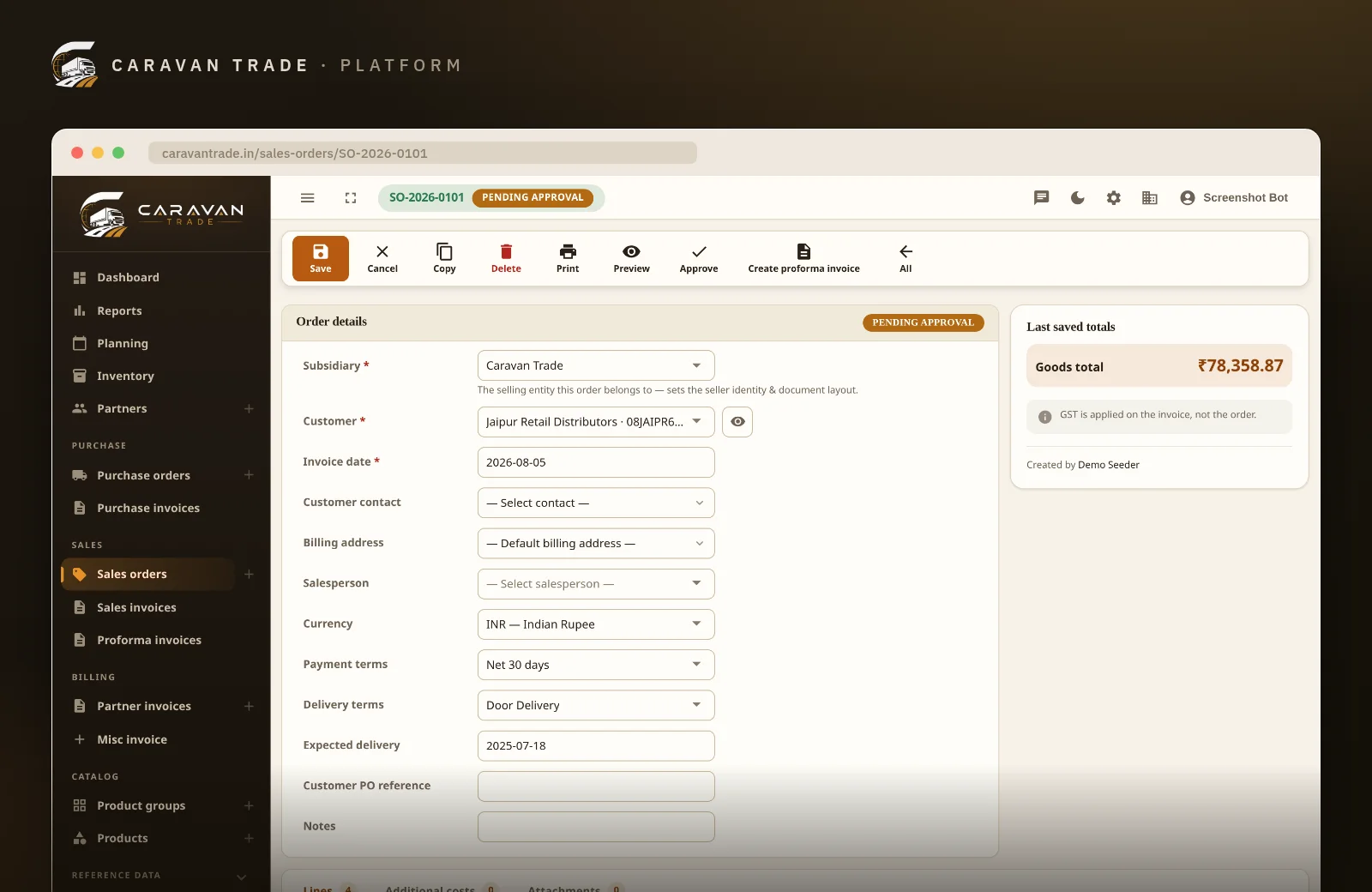
Billing that starts from a blank invoice
Most GST billing tools begin where the risk is highest: an empty invoice form, retyped from an order that lives somewhere else.
Invoices typed by hand
- Anyone can bill anything — there is no approval standing in the way
- A part-shipment means a calculator and a guess at what was already billed
- CGST/SGST vs IGST is whatever the operator remembered to pick
- A mistyped GSTIN surfaces months later, at GSTR reconciliation
- Invoice numbers skip, repeat or restart whenever the spreadsheet does
Invoices raised in Caravan Trade
- Only an approved order can be invoiced — the gate is in the code
- The system computes what is already billed and invoices the remainder
- The tax split follows the partner's checksum-verified GSTIN
- A bad GSTIN is refused at the keyboard, not discovered at filing
- Numbers follow your scheme, keyed off the business date
Sales order management, from draft to money
One pipeline, five stations. Each hand-off is a status change the next step checks — so nothing skips the queue.
1. Draft
Capture the order — customer, lines, packaging, terms — while it is still editable.
2. Approve
Submit for approval. Someone with the permission signs off — or it goes nowhere.
3. Dispatch
Only an approved order dispatches, drawing the goods down from stock.
4. Invoice
Bill the whole order or single lines; the remainder is computed for you.
5. Collect
Issue locks the invoice; payment is recorded against the issued document.
A proforma can be raised at almost any point along that pipeline — it is the one document that does not have to wait, because it is a quote, not an account entry.
Per-line invoicing, proforma invoices and GST that resolves itself
The machinery under the pipeline — what each gate actually checks, and what that buys you at filing time.
A real approval gate, not a status label
A sales order moves Draft → Pending approval → Approved → Dispatched, and can be cancelled at any open stage. These are not decorative labels: dispatch checks for Approved, invoicing checks for Dispatched, and e-mailing the customer is only offered once the order is confirmed. The person who keys an order and the person who approves it can be different people, by permission.
- Draft → Pending approval → Approved → Dispatched, enforced in the domain
- Only an approved order can dispatch — and dispatch issues the stock
- Cancel from any open stage; a dispatched order is history, not editable
- Customer details frozen onto the order as a snapshot — later edits to the partner never rewrite it
- Freight, brokerage and other costs recorded per partner, each in its own currency, never folded into the goods total
Invoice the whole order — or line by line
Part-shipments are normal in wholesale, so billing follows the lines, not the document. Raise an invoice for a single order line the day it ships, then a whole-order invoice later: Caravan Trade remembers which lines earlier invoices covered and bills only the remainder. The guard is airtight — even two simultaneous "create invoice" clicks cannot bill the same line twice.
- One-click invoice for a single line of a dispatched order
- Whole-order invoice covers only the lines not already billed
- Every invoice line remembers the order line it came from
- An edited line can never bill more quantity than its order line sold
- Double-billing blocked even under concurrent submits
CGST + SGST or IGST — decided by data, not memory
The tax split on every document follows the place of supply. A registered partner's GSTIN is validated in full — shape, state code and the mod-36 checksum — and the state it encodes is authoritative; an unregistered Indian partner's state is resolved against the official state-code table. A single mistyped character is refused at the keyboard instead of mis-splitting tax that surfaces months later at GSTR reconciliation.
- GSTIN checksum verification on partner records — with the exact reason when it fails
- CGST and SGST as independent per-line component rates, plus cess where it applies
- HSN code on every invoice line
- Tax arithmetic in integer paise, rounded half-up — totals reconcile to the rupee
- Export customers handled too: outside India there is no GSTIN to demand, and the region stays as typed
Proforma invoices that quote without committing
Need to quote a customer or request an advance before anything moves? Raise a proforma from the sales order at any stage except cancelled — even a draft. It is an indicative, fixed snapshot of the order at that moment, numbered in its own PF series, and it never touches your accounts: converting it to a real invoice goes through the ordinary approval-and-dispatch gates, so a quote can never shortcut the pipeline.
- Raisable from any non-cancelled order — no waiting for approval to quote
- Fixed snapshot at creation; there is deliberately no edit step
- Draft → Issued → Converted, or cancelled before conversion
- Its own numbering series, separate from real invoices
- E-mail the issued proforma with the PDF attached
Document numbering your accountant designed
Each document type follows an admin-defined scheme — a pattern of year, month and financial-year tokens around a zero-padded sequence. The financial year is computed from the document's business date, not the wall clock, and a scheme can keep a separate counter per financial year, calendar year or month. Enter a March invoice in April and it numbers into last year's series without disturbing this year's.
- Patterns per document type: orders, invoices, proformas each have their own
- Tokens for year, month, day and the Indian financial year — long and short forms
- Sequence resets per financial year, calendar year, month — or never
- Backdated documents draw from their own period's counter
- Issuing locks the number; issued invoices are cancelled, never deleted, so series stay continuous
Every document on your own letterhead
Orders, invoices and proformas render as typeset PDFs — no browser print dialogs, no layout drift. Each subsidiary uploads its own letterhead artwork and states the top and bottom clearance its stationery needs, so the content lands exactly in the blank middle of pre-printed paper or just below a header banner. Running several business units? Each one's documents print on its own paper, numbered in its own series.
- Typeset PDF output for orders, invoices and proformas
- Letterhead uploaded per subsidiary, with adjustable clearances
- Clean typeset header as the fallback — nothing breaks before you upload
- Packaging details frozen onto lines, so a renamed pack never rewrites an issued invoice
- Send documents by e-mail with the PDF attached
“Partial shipments used to mean a calculator and crossed fingers. Now the open lines are just there — one click bills exactly what's left.”
See it on your own orders. Book a 30-minute demo — no credit card, no obligation.The arithmetic your auditor will check
GST billing lives or dies on details most software rounds away. These are deliberate decisions, not defaults.
- Paise, not floats
- Tax arithmetic runs in integer minor units, rounded half-up to the paisa — so line taxes, document totals and your GST workings reconcile exactly, every time.
- Discount before tax
- Line discounts are a bounded percentage taken off the gross before tax, and both sides of the ledger share the same arithmetic — sales and purchasing cannot round a discount differently.
- Business date rules
- The date on the document — not the moment you pressed save — drives the financial year in its number. Late entry does not corrupt your series.
- Costs stay honest
- Freight, brokerage and other order costs are recorded against their own partner, each in its own currency, and are never silently folded into the goods total.
- Snapshots, not links
- Customer details and packaging are frozen onto each document when it is raised. Rename a partner or retire a pack size tomorrow — yesterday's invoice still reads exactly as issued.
- Your fields too
- Need a vehicle number, e-way bill reference or container ID on lines and documents? Add your own fields per business unit without waiting for a release.
The complete capability list
No tiers hiding approvals or per-line billing behind an upgrade. This is what sales orders & invoicing do.
Sales orders
The pipeline every invoice stands on.
Invoicing
Whole orders, single lines, and nothing twice.
GST
Compliance decided by data.
Documents & numbering
What leaves the building with your name on it.
Invoicing is wired into the rest of your trade
An invoice is trustworthy because it is the consequence of an order, a dispatch and a stock movement — all in the same system.
Inventory
Dispatch draws stock down lot by lot, so billing and the warehouse agree. Batch & lot tracking →
Purchasing
The goods you bill arrived on purchase orders with the same approval discipline. Purchase order management →
Reports & analytics
Sales, receivables and GST views over the same live data. Reports & analytics →
Partners
Customers, transporters and brokers, each with verified GST details and terms.
Multi-subsidiary
Each business unit raises documents on its own letterhead, in its own series.
Permissions
Keying an order and approving it are different capabilities — grant them separately.
Receivables
Issued invoices carry due dates and payment status, feeding the dashboard.
Analytics assistant
Ask in plain English which invoices are overdue — and see the figures behind the answer.
Trades where billing follows the goods
If your invoices come from orders, ship in parts and end up in a GST filing, a standalone invoice generator was never going to be enough.
Wholesale distribution
High order volumes, part-shipments and credit terms — where per-line billing earns its keep daily.
Import & export
Foreign customers with no GSTIN, freight in other currencies, documents that must match the consignment.
Dry fruits, nuts & spices
Weight-based lines, HSN codes and advances against seasonal stock — quoted on proformas first.
Commodity traders
Thin margins where a mis-split tax or a double-billed line is real money, caught months late.
Gifting & hamper brands
Corporate orders approved by one person, dispatched by another, billed by a third.
Multi-entity groups
Several subsidiaries, each with its own letterhead, numbering series and GST registration.
Billing from the system in three steps
You do not need to migrate history. Most businesses start with the next order they take.
Load partners & set your numbering
Customers come in with their GSTINs — verified on entry — and each document type gets the number pattern your accountant wants.
Upload your letterhead
Each subsidiary uploads its stationery once and sets the clearances. Every PDF from then on prints on your paper.
Run the next order through
Draft, approve, dispatch, invoice. From the first document, your GST split, numbering and billing coverage take care of themselves.
Questions traders actually ask
Who is this GST billing software built for?
Wholesalers, distributors, importers and exporters who sell physical goods in bulk against real sales orders — businesses that need approvals, part-shipments, per-line invoices and clean GST paperwork. It is not a retail point-of-sale or a standalone invoice generator: every invoice here is raised from an order, so billing and fulfilment can never disagree.
What has to happen before an invoice can be raised?
A sales order moves Draft → Pending approval → Approved → Dispatched, and only an approved order can be invoiced. That single rule means an invoice always stands on goods somebody actually reviewed and signed off — no billing a draft somebody forgot to review.
Can I invoice part of an order?
Yes, two ways. You can raise an invoice for a single order line, or raise a whole-order invoice — which covers only the lines not already billed, because the system computes what earlier invoices took care of. Two simultaneous clicks cannot bill the same line twice, and an edited invoice line can never bill more quantity than its source order line sold.
How does it decide CGST + SGST versus IGST?
From the place of supply. A partner’s GSTIN is verified in full — shape, state code and the mod-36 checksum — and the state encoded in it is authoritative; an unregistered Indian partner’s state is resolved against the official state-code table instead. That resolution decides whether a document splits into CGST + SGST or charges IGST, and CGST and SGST are independent per-line component rates, with cess where it applies and an HSN code on every line.
What is a proforma invoice here?
An indicative, non-accounting preview you can raise from a sales order at any stage except cancelled — even a draft — to quote the customer or request an advance. It is a fixed snapshot taken at creation (numbered in its own PF series), moves Draft → Issued → Converted, and converting it raises a real invoice through the ordinary invoicing gates, so it can never sneak past approval and dispatch.
Can I control my document numbers?
Yes. Each document type follows an admin-defined numbering scheme — patterns like INV/[FY]/0001 with year, month and financial-year tokens plus a zero-padded sequence. The financial year is computed off the document’s business date, not the wall clock, and a scheme can keep one counter per financial year, calendar year or month — so a backdated March invoice numbers into last year’s series without disturbing this year’s.
What do printed invoices look like?
Every order, invoice and proforma renders as a typeset PDF. A subsidiary can upload its own letterhead artwork with top and bottom clearances, and its documents print on that stationery; with no artwork uploaded the template falls back to a clean typeset header. Confirmed documents can be e-mailed to the customer with the PDF attached.
What happens after an invoice is issued?
Issuing locks it — the number and the GST figures are final, and only a draft is ever editable. An issued invoice can be marked paid or cancelled, but never deleted, so your numbered series stays continuous and auditable.
Where to go next
Inventory management
Batch & lot tracking, moving-average costing and the ledger your dispatches draw from.
Read about inventory →Purchase orders
The buying side of the same discipline — approvals, receipts and landed goods.
Read about purchasing →Pricing
Straightforward plans with approvals and per-line billing included, not gated behind a tier.
View pricing →See your own order become an invoice
Thirty minutes, your products, your customers. We will walk one order from draft through approval and dispatch to a GST invoice on your letterhead — and show you the per-line billing on the way. We usually reply within one business day.
Already a customer? Log in to your back office.